



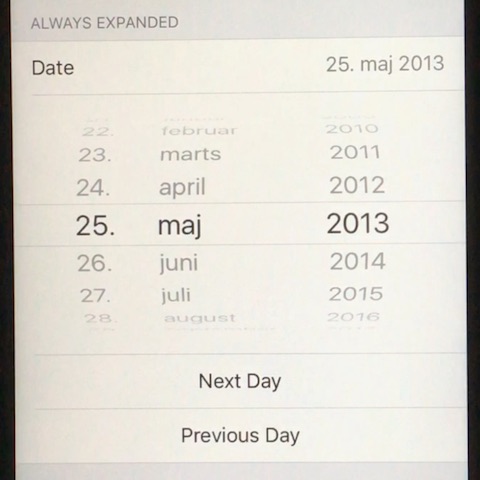
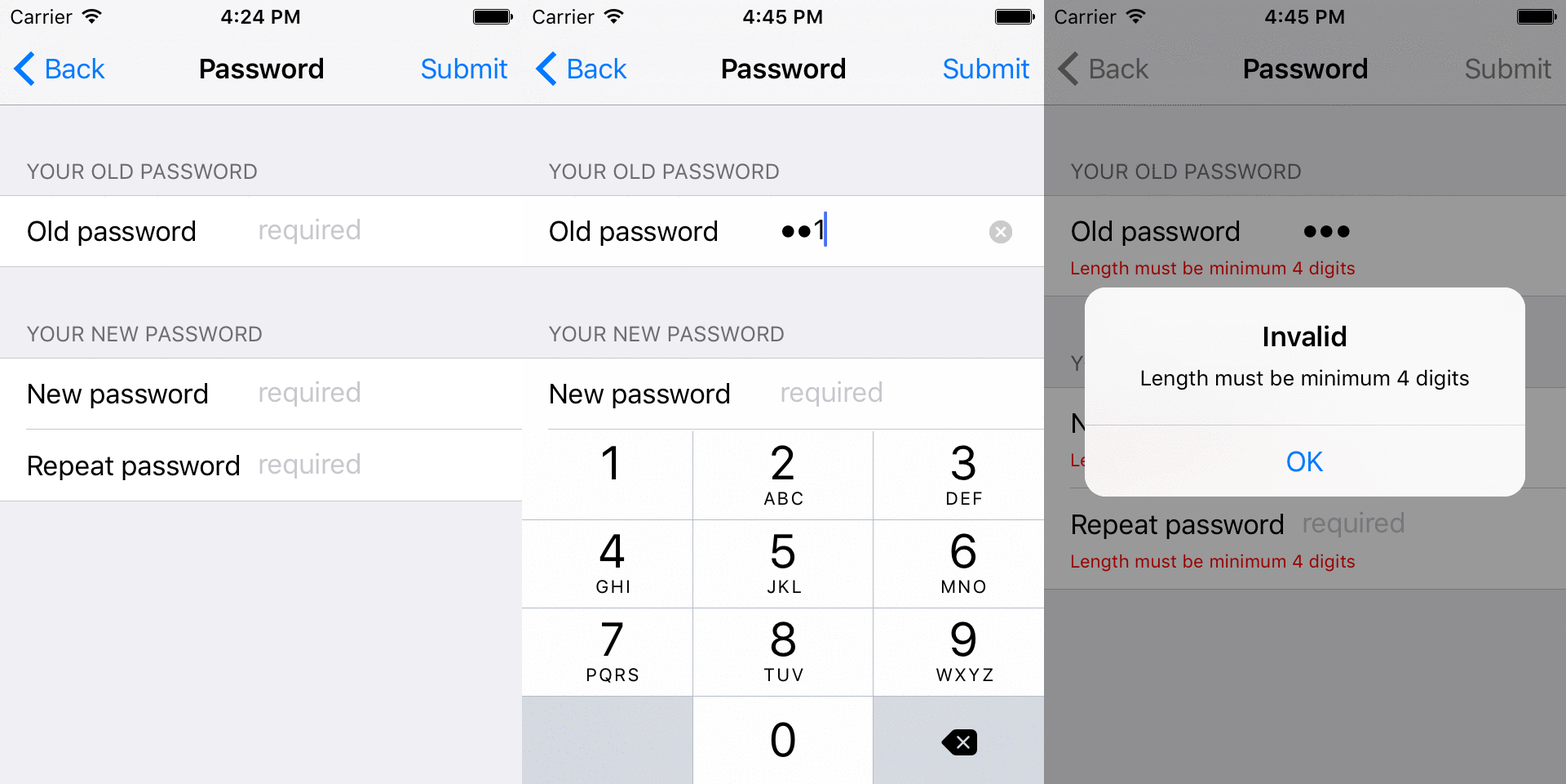
SwiftyFORM SwiftyFORM is an iOS framework for creating forms. Because form code is hard to write, hard to read, hard to reason about. Has a slow turn around time. Is painful to maintain. SwiftyFORM demo on YouTube Development happens in the develop branch. Requirements iOS 9.0+ Xcode 8.1+ Swift 3.0+ Features Several form items, such as textfield, buttons, sliders Some form items can expand/collapse, such as datepicker, pickerview You can create your own custom form items Align textfields across multiple rows Form validation rule engine Shows with red text where there are problems with validation Strongly Typed Pure Swift No 3rd party dependencies USAGE Tutorial 0 - Static text import SwiftyFORM class MyViewController : FormViewController { override func populate ( _ builder : FormBuilder) { builder += StaticTextFormItem (). title ( " Hello " ). value ( " World " ) } } Tutorial 1 - TextField import SwiftyFORM class MyViewController : FormViewController { override func populate ( _ builder : FormBuilder) { builder += TextFieldFormItem (). title ( " Email " ). placeholder ( " Please specify " ). keyboardType (. emailAddress ) } } Tutorial 2 - Open child view controller import SwiftyFORM class MyViewController : FormViewController { override func populate ( _ builder : FormBuilder) { builder += ViewControllerFormItem (). title ( " Go to view controller " ). viewController (FirstViewController. self ) } } Advanced - date picker class DatePickerBindingViewController : FormViewController { override func populate ( _ builder : FormBuilder) { builder += datePicker builder += incrementButton builder += decrementButton builder += SectionFormItem () builder += summary updateSummary () } lazy var datePicker : DatePickerFormItem = { let instance = DatePickerFormItem () instance. title = " Date " instance. datePickerMode = . date instance. behavior = . expandedAlways instance. valueDidChangeBlock = { [ weak self ] _ in self ? . updateSummary () } return instance }() lazy var incrementButton : ButtonFormItem = { let instance = ButtonFormItem () instance. title = " Next Day " instance. action = { [ weak self ] in self ? . increment () } return instance }() lazy var decrementButton : ButtonFormItem = { let instance = ButtonFormItem () instance. title = " Previous Day " instance. action = { [ weak self ] in self ? . decrement () } return instance }() lazy var summary : StaticTextFormItem = { return StaticTextFormItem (). title ( " Date " ). value ( " - " ) }() func updateSummary () { summary. value = " \( datePicker. value ) " } func offsetDate ( _ date : Date, days : Int ) -> Date { var dateComponents = DateComponents () dateComponents. day = days let calendar = Calendar. current guard let resultDate = calendar. date ( byAdding : dateComponents, to : date) else { return date } return resultDate } func increment () { datePicker. setValue ( offsetDate (datePicker. value , days : 1 ), animated : true ) updateSummary () } func decrement () { datePicker. setValue ( offsetDate (datePicker. value , days : -1 ), animated : true ) updateSummary () } } Advanced - Validation class ChangePasswordViewController : FormViewController { override func populate ( _ builder : FormBuilder) { builder. navigationTitle = " Password " builder += SectionHeaderTitleFormItem (). title ( " Your Old Password " ) builder += passwordOld builder += SectionHeaderTitleFormItem (). title ( " Your New Password " ) builder += passwordNew builder += passwordNewRepeated builder. alignLeft ([passwordOld, passwordNew, passwordNewRepeated]) } lazy var passwordOld : TextFieldFormItem = { let instance = TextFieldFormItem () instance. title ( " Old password " ). password (). placeholder ( " required " ) instance. keyboardType = . numberPad instance. autocorrectionType = . no instance. validate (CharacterSetSpecification. decimalDigitCharacterSet (), message : " Must be digits " ) instance. submitValidate (CountSpecification. min ( 4 ), message : " Length must be minimum 4 digits " ) instance. validate (CountSpecification. max ( 6 ), message : " Length must be maximum 6 digits " ) return instance }() lazy var passwordNew : TextFieldFormItem = { let instance = TextFieldFormItem () instance. title ( " New password " ). password (). placeholder ( " required " ) instance. keyboardType = . numberPad instance. autocorrectionType = . no instance. validate (CharacterSetSpecification. decimalDigitCharacterSet (), message : " Must be digits " ) instance. submitValidate (CountSpecification. min ( 4 ), message : " Length must be minimum 4 digits " ) instance. validate (CountSpecification. max ( 6 ), message : " Length must be maximum 6 digits " ) return instance }() lazy var passwordNewRepeated : TextFieldFormItem = { let instance = TextFieldFormItem () instance. title ( " Repeat password " ). password (). placeholder ( " required " ) instance. keyboardType = . numberPad instance. autocorrectionType = . no instance. validate (CharacterSetSpecification. decimalDigitCharacterSet (), message : " Must be digits " ) instance. submitValidate (CountSpecification. min ( 4 ), message : " Length must be minimum 4 digits " ) instance. validate (CountSpecification. max ( 6 ), message : " Length must be maximum 6 digits " ) return instance }() } INSTALLATION CocoaPods CocoaPods is a dependency manager for Cocoa projects. You can install it with the following command: $ gem install cocoapods To integrate SwiftyFORM into your Xcode project using CocoaPods, specify it in your Podfile : source https://github.com/CocoaPods/Specs.git platform :ios , 9.0 use_frameworks! pod SwiftyFORM Then, run the following command: $ pod install Carthage Link to demo project that shows a minimal SwiftyFORM app using Carthage . To integrate SwiftyFORM into your Xcode project using Carthage, specify it in your Cartfile : github "neoneye/SwiftyFORM" ~> 1.2 Then, run the following command: $ carthage update Finally, add SwiftyFORM.framework (will be built by Carthage under Carthage/Build/iOS/ ) to your projects Linked Frameworks and Libraries in the General tab, and add a new Run Script Build Phase: Set /bin/bash as the shell write /usr/local/bin/carthage copy-frameworks in the script body add $(SRCROOT)/Carthage/Build/iOS/SwiftyFORM.framework to the input files
iOS framework for creating forms
3997
来源:
Licence:
联系:
分类:
平台:
环境:
大小:
更新:
标签:
免费下载
×


温馨提示
请用电脑打开本网页,即可以免费获取你想要的了。
