

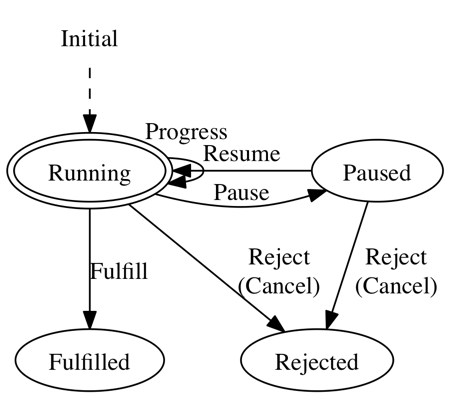
SwiftTask Promise + progress + pause + cancel + retry for Swift. How to install See ReactKit Wiki page . Example Basic // define task let task = Task < Float , String , NSError > { progress, fulfill, reject, configure in player. doSomethingWithProgress ({ ( progressValue : Float ) in progress (progressValue) // optional }, completion : { ( value : NSData ? , error : NSError ? ) in if error == nil { fulfill ( " OK " ) } else { reject (error) } }) // pause/resume/cancel configuration (optional) configure. pause = { [ weak player] in player ? . pause () } configure. resume = { [ weak player] in player ? . resume () } configure. cancel = { [ weak player] in player ? . cancel () } } // set success & failure task. success { ( value : String ) -> Void in // do something with fulfilled value }. failure { ( error : NSError ? , isCancelled : Bool ) -> Void in // do something with rejected error } // you can call configured operations outside of Task-definition task. pause () task. resume () task. cancel () Notice that player has following methods, which will work nicely with SwiftTask : doSomethingWithProgress(_:completion:) (progress callback as optional) pause() (optional) resume() (optional) cancel() (optional) One of the best example would be Alamofire (networking library) as seen below. Using Alamofire typealias Progress = (bytesWritten: Int64 , totalBytesWritten: Int64 , totalBytesExpectedToWrite: Int64 ) typealias AlamoFireTask = Task< Progress , String , NSError > // define task let task = AlamoFireTask { progress, fulfill, reject, configure in Alamofire. download (. GET , " http://httpbin.org/stream/100 " , destination : somewhere) . progress { bytesWritten, totalBytesWritten, totalBytesExpectedToWrite in progress ((bytesWritten, totalBytesWritten, totalBytesExpectedToWrite) as Progress) }. response { request, response, data, error in if let error = error { reject (error) return } fulfill ( " OK " ) } return } // set progress & then task. progress { ( oldProgress : Progress ? , newProgress : Progress) in println ( " \( newProgress. bytesWritten ) " ) println ( " \( newProgress. totalBytesWritten ) " ) println ( " \( newProgress. totalBytesExpectedToWrite ) " ) }. then { ( value : String ? , errorInfo : AlamoFireTask. ErrorInfo ? ) -> Void in // do something with fulfilled value or rejected errorInfo } Retry-able Task can retry for multiple times by using retry() method. For example, task.retry(n) will retry at most n times (total tries = n+1 ) if task keeps rejected, and task.retry(0) is obviously same as task itself having no retries. This feature is extremely useful for unstable tasks e.g. network connection. By implementing retryable from SwiftTask s side, similar code is no longer needed for player (inner logic) class. task. retry ( 2 ). progress { ... }. success { ... // this closure will be called even when task is rejected for 1st & 2nd try // but finally fulfilled in 3rd try. } For more examples, please see XCTest cases. API Reference Task.init(initClosure:) Define your task inside initClosure . let task = Task < Float , NSString ? , NSError > { progress, fulfill, reject, configure in player. doSomethingWithCompletion { ( value : NSString ? , error : NSError ? ) in if error == nil { fulfill (value) } else { reject (error) } } } In order to pipeline future task.value or task.errorInfo (tuple of (error: Error?, isCancelled: Bool) ) via then() / success() / failure() , you have to call fulfill(value) and/or reject(error) inside initClosure . Optionally, you can call progress(progressValue) multiple times before calling fulfill / reject to transfer progressValue outside of the initClosure , notifying it to task itself. To add pause / resume / cancel functionality to your task , use configure to wrap up the original one. // NOTE: use weak to let task NOT CAPTURE player via configure configure. pause = { [ weak player] in player ? . pause () } configure. resume = { [ weak player] in player ? . resume () } configure. cancel = { [ weak player] in player ? . cancel () } task.progress(_ progressClosure:) -> task task. progress { ( oldProgress : Progress ? , newProgress : Progress) in println (newProgress) return }. success { ... } task.progress(progressClosure) will add progressClosure to observe old/new progressValue which is notified from inside previous initClosure . This method will return same task , so it is useful to chain with forthcoming then / success / failure . task.then(_ thenClosure:) -> newTask task.then(thenClosure) will return a new task where thenClosure will be invoked when task is either fulfilled or rejected . This case is similar to JavaScripts promise.then(onFulfilled, onRejected) . thenClosure can be two types of closure form: thenClosure: (Value?, ErrorInfo?) -> Value2 (flow: task => newTask ) // let task will be fulfilled with value "Hello" task. then { ( value : String ? , errorInfo : ErrorInfo ? ) -> String in // nil-check to find out whether task is fulfilled or rejected if errorInfo == nil { return " \( value ! ) World " } else { return " \( value ! ) Error " } }. success { ( value : String ) -> Void in println ( " \( value) " ) // Hello World return " } thenClosure: (Value?, ErrorInfo?) -> Task (flow: task => task2 => newTask ) // let task will be fulfilled with value "Hello" task. then { ( value : String ? , errorInfo : ErrorInfo ? ) -> Task < Float , String , NSError > in if errorInfo == nil { // let task2 will be fulfilled with value "\(value!) Swift" let task2 = ... return task2 } else { return someOtherTask } }. success { ( value : String ) -> Void in println ( " \( value) " ) // Hello Swift return " } task.success(_ successClosure:) -> newTask Similar to then() method, task.success(successClosure) will return a new task, but this time, successClosure will be invoked when task is only fulfilled . This case is similar to JavaScripts promise.then(onFulfilled) . // let task will be fulfilled with value "Hello" task. success { ( value : String ) -> String in return " \( value) World " }. success { ( value : String ) -> Void in println ( " \( value) " ) // Hello World return " } task.failure(_ failureClosure:) -> newTask Just the opposite of success() , task.failure(failureClosure) will return a new task where failureClosure will be invoked when task is only rejected/cancelled . This case is similar to JavaScripts promise.then(undefined, onRejected) or promise.catch(onRejected) . // let task will be rejected with error "Oh My God" task. success { ( value : String ) -> Void in println ( " \( value) " ) // never reaches here return }. failure { ( error : NSError ? , isCancelled : Bool ) -> Void in println ( " \( error ! ) " ) // Oh My God return } task.try(_ tryCount:) -> newTask See Retry-able section . Task.all(_ tasks:) -> newTask Task.all(tasks) is a new task that performs all tasks simultaneously and will be: fulfilled when all tasks are fulfilled rejected when any of the task is rejected Task.any(_ tasks:) -> newTask Task.any(tasks) is an opposite of Task.all(tasks) which will be: fulfilled when any of the task is fulfilled rejected when all tasks are rejected Task.some(_ tasks:) -> newTask Task.some(tasks) is a new task that performs all tasks without internal rejection, and is fulfilled with given tasks s fulfilled values. Note that this new task will be fulfilled with empty value-array, even though all tasks are rejected. Related Articles SwiftTask(Promise拡張)を使う - Qiita (Japanese, ver 1.0.0) Licence MIT
Promise + progress + pause + cancel + retry for Swift.
3997
来源:
Licence:
联系:
分类:
平台:
环境:
大小:
更新:
标签:
免费下载
×


温馨提示
请用电脑打开本网页,即可以免费获取你想要的了。
