


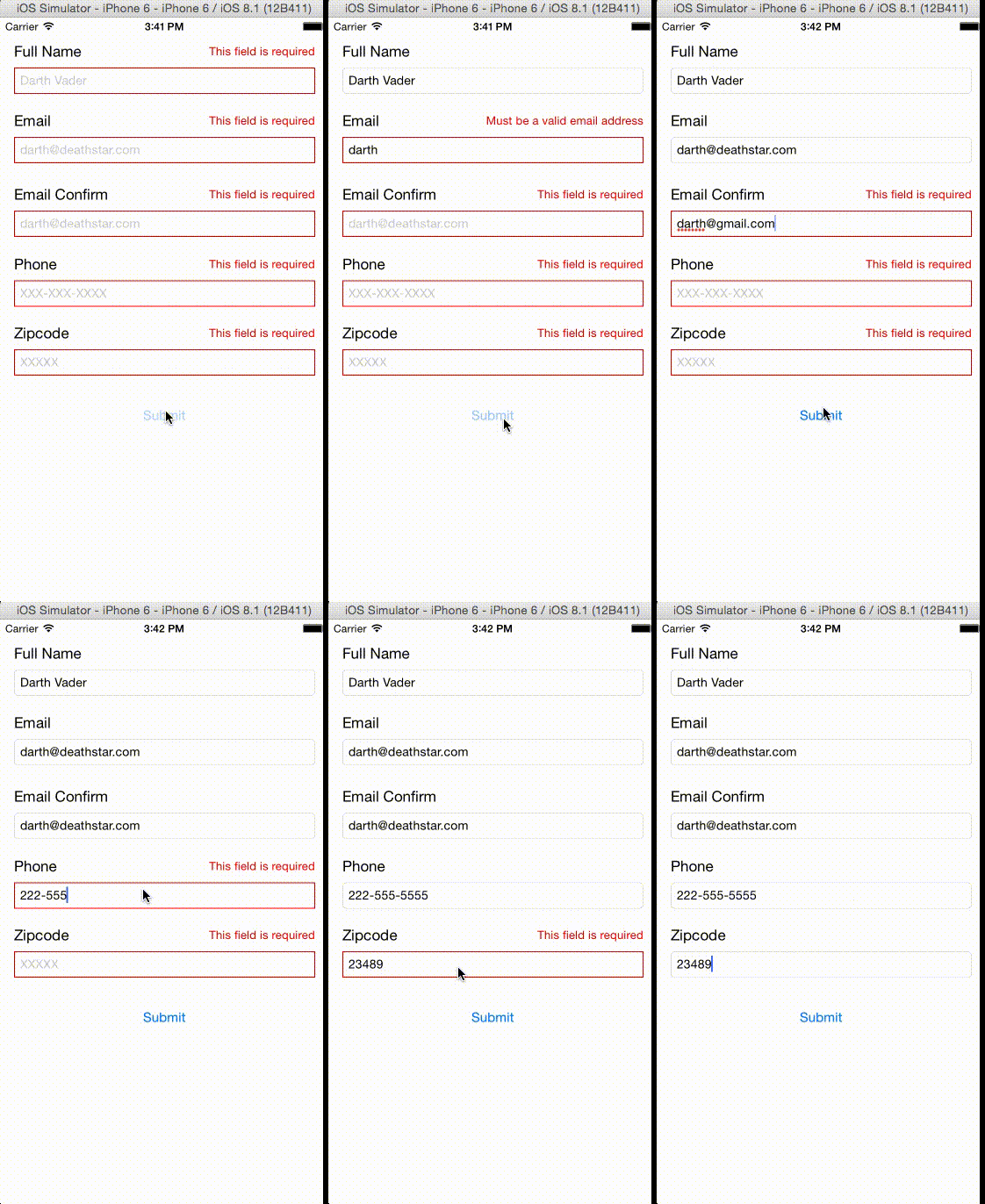
SwiftValidator Swift Validator is a rule-based validation library for Swift. Core Concepts UITextField + [Rule] + (and optional error UILabel ) go into Validator UITextField + ValidationError come out of Validator Validator evaluates [Rule] sequentially and stops evaluating when a Rule fails. Installation # Podfile source https://github.com/CocoaPods/Specs.git platform :ios , " 8.1 " use_frameworks! # Swift 3 # Extended beyond UITextField pod SwiftValidator , :git => https://github.com/jpotts18/SwiftValidator.git , :branch => master # Swift 2.1 # Extended beyond UITextField # Note: Installing 4.x.x will break code from 3.x.x pod SwiftValidator , :git => https://github.com/jpotts18/SwiftValidator.git , :tag => 4.0.0 # Swift 2.1 (limited to UITextField validation) pod SwiftValidator , :git => https://github.com/jpotts18/SwiftValidator.git , :tag => 3.0.5 Install into your project: $ pod install Open your project in Xcode from the .xcworkspace file (not the usual project file): $ open MyProject.xcworkspace If you are using Carthage you will need to add this to your Cartfile github " jpotts18/SwiftValidator " Usage You can now import SwiftValidator framework into your files. Initialize the Validator by setting a delegate to a View Controller or other object. // ViewController.swift let validator = Validator () Register the fields that you want to validate override func viewDidLoad () { super . viewDidLoad () // Validation Rules are evaluated from left to right. validator. registerField (fullNameTextField, rules : [ RequiredRule (), FullNameRule ()]) // You can pass in error labels with your rules // You can pass in custom error messages to regex rules (such as ZipCodeRule and EmailRule) validator. registerField (emailTextField, errorLabel : emailErrorLabel, rules : [ RequiredRule (), EmailRule ( message : " Invalid email " )]) // You can validate against other fields using ConfirmRule validator. registerField (emailConfirmTextField, errorLabel : emailConfirmErrorLabel, rules : [ ConfirmationRule ( confirmField : emailTextField)]) // You can now pass in regex and length parameters through overloaded contructors validator. registerField (phoneNumberTextField, errorLabel : phoneNumberErrorLabel, rules : [ RequiredRule (), MinLengthRule ( length : 9 )]) validator. registerField (zipcodeTextField, errorLabel : zipcodeErrorLabel, rules : [ RequiredRule (), ZipCodeRule (regex = " \\ d{5} " )]) // You can unregister a text field if you no longer want to validate it validator. unregisterField (fullNameTextField) } Validate Fields on button tap or however you would like to trigger it. @IBAction func signupTapped ( sender : AnyObject ) { validator. validate ( self ) } Implement the Validation Delegate in your View controller // ValidationDelegate methods func validationSuccessful () { // submit the form } func validationFailed ( errors :[(Validatable ,ValidationError)]) { // turn the fields to red for (field, error) in errors { if let field = field as? UITextField { field. layer . borderColor = UIColor. redColor (). CGColor field. layer . borderWidth = 1.0 } error. errorLabel ? . text = error. errorMessage // works if you added labels error. errorLabel ? . hidden = false } } Single Field Validation You may use single field validation in some cases. This could be useful in situations such as controlling responders: // Dont forget to use UITextFieldDelegate // and delegate yourTextField to self in viewDidLoad() func textFieldShouldReturn ( textField : UITextField) -> Bool { validator. validateField (textField){ error in if error == nil { // Field validation was successful } else { // Validation error occurred } } return true } Custom Validation We will create a SSNRule class to show how to create your own Validation. A United States Social Security Number (or SSN) is a field that consists of XXX-XX-XXXX. Create a class that inherits from RegexRule class SSNVRule : RegexRule { static let regex = " ^ \\ d{3}- \\ d{2}- \\ d{4}$ " convenience init ( message : String = " Not a valid SSN " ){ self . init ( regex : SSNVRule. regex , message : message) } } Documentation Checkout the docs here via @jazzydocs . Credits Swift Validator is written and maintained by Jeff Potter @jpotts18 . David Patterson @dave_tw12 actively works as a collaborator. Special thanks to Deniz Adalar for adding validation beyond UITextField. Contributing Fork it Create your feature branch git checkout -b my-new-feature Commit your changes git commit -am Add some feature Push to the branch git push origin my-new-feature Create a new Pull Request Make sure code coverage is at least 70%
A rule-based validation library for Swift
3997
来源:
Licence:
联系:
分类:
平台:
环境:
大小:
更新:
标签:
免费下载
×


温馨提示
请用电脑打开本网页,即可以免费获取你想要的了。
