


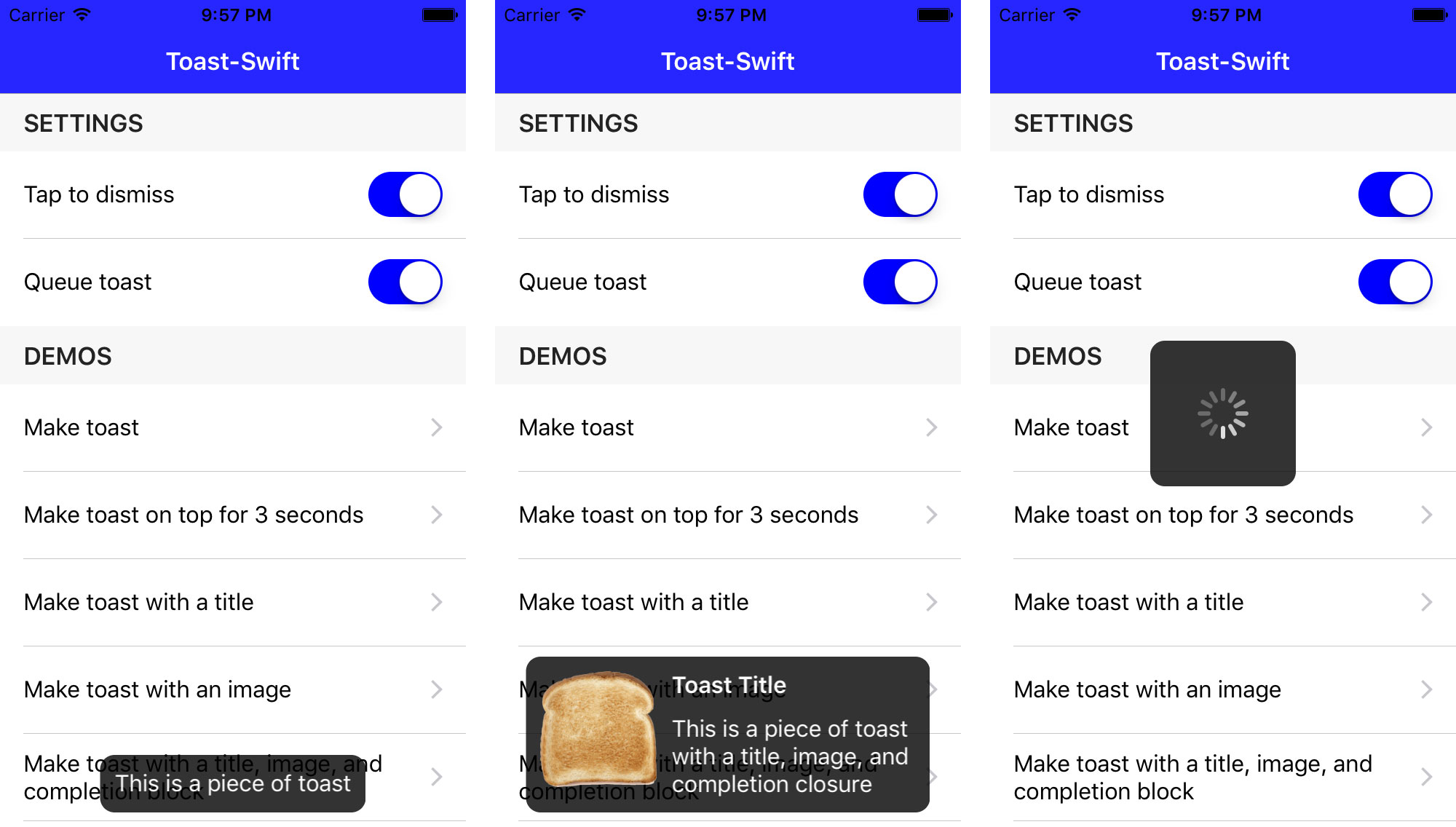
Toast-Swift Toast-Swift is a Swift extension that adds toast notifications to the UIView object class. It is intended to be simple, lightweight, and easy to use. Most toast notifications can be triggered with a single line of code. Toast-Swift is a native Swift port of Toast for iOS . Screenshots Basic Examples // basic usage self . view . makeToast ( " This is a piece of toast " ) // toast with a specific duration and position self . view . makeToast ( " This is a piece of toast " , duration : 3.0 , position : . top ) // toast with all possible options self . view . makeToast ( " This is a piece of toast " , duration : 2.0 , position : CGPoint ( x : 110.0 , y : 110.0 ), title : " Toast Title " , image : UIImage ( named : " toast.png " ), style : nil ) { ( didTap : Bool ) -> Void in if didTap { print ( " completion from tap " ) } else { print ( " completion without tap " ) } } // display toast with an activity spinner self . view . makeToastActivity (. center ) // display any view as toast self . view . showToast (myView) But wait, theres more! // create a new style let style = ToastStyle () // this is just one of many style options style. messageColor = UIColor. blue // present the toast with the new style self . view . makeToast ( " This is a piece of toast " , duration : 3.0 , position : . bottom , style : style) // or perhaps you want to use this style for all toasts going forward? // just set the shared style and theres no need to provide the style again ToastManager. shared . style = style // toggle "tap to dismiss" functionality ToastManager. shared . tapToDismissEnabled = true // toggle queueing behavior ToastManager. shared . queueEnabled = true See the demo project for more examples. Setup Instructions CocoaPods To integrate Toast-Swift into your Xcode project using CocoaPods, specify it in your Podfile : platform :ios , 8.0 pod Toast-Swift , ~> 2.0.0 and in your code add import Toast_Swift . Carthage To integrate Toast-Swift into your Xcode project using Carthage, specify it in your Cartfile : github "scalessec/Toast-Swift" ~> 2.0.0 Run carthage update to build the framework and drag the built ToastSwiftFramework.framework into your Xcode project. and in your code add import ToastSwiftFramework . Manually Add Toast.swift to your project. Link against QuartzCore. Compatibility Version 2.0.0 and later requires Swift 3 and Xcode 8. Version 1.4.0 requires Swift 2.2 and Xcode 7.3. Version 1.0.0 can be used with Swift 2.1 and earlier versions of Xcode. MIT License Copyright (c) 2016 Charles Scalesse. Permission is hereby granted, free of charge, to any person obtaining a copy of this software and associated documentation files (the "Software"), to deal in the Software without restriction, including without limitation the rights to use, copy, modify, merge, publish, distribute, sublicense, and/or sell copies of the Software, and to permit persons to whom the Software is furnished to do so, subject to the following conditions: The above copyright notice and this permission notice shall be included in all copies or substantial portions of the Software. THE SOFTWARE IS PROVIDED "AS IS", WITHOUT WARRANTY OF ANY KIND, EXPRESS OR IMPLIED, INCLUDING BUT NOT LIMITED TO THE WARRANTIES OF MERCHANTABILITY, FITNESS FOR A PARTICULAR PURPOSE AND NONINFRINGEMENT. IN NO EVENT SHALL THE AUTHORS OR COPYRIGHT HOLDERS BE LIABLE FOR ANY CLAIM, DAMAGES OR OTHER LIABILITY, WHETHER IN AN ACTION OF CONTRACT, TORT OR OTHERWISE, ARISING FROM, OUT OF OR IN CONNECTION WITH THE SOFTWARE OR THE USE OR OTHER DEALINGS IN THE SOFTWARE.
A Swift extension that adds toast notifications to the UIView object class.
3997
来源:
Licence:
联系:
分类:
平台:
环境:
大小:
更新:
标签:
免费下载
×


温馨提示
请用电脑打开本网页,即可以免费获取你想要的了。
